Control every projector.
From one grid.
Control and monitor a whole wall of Panasonic projectors from one window - and hear about a problem before the audience sees it. Free and open source, for Windows and macOS.
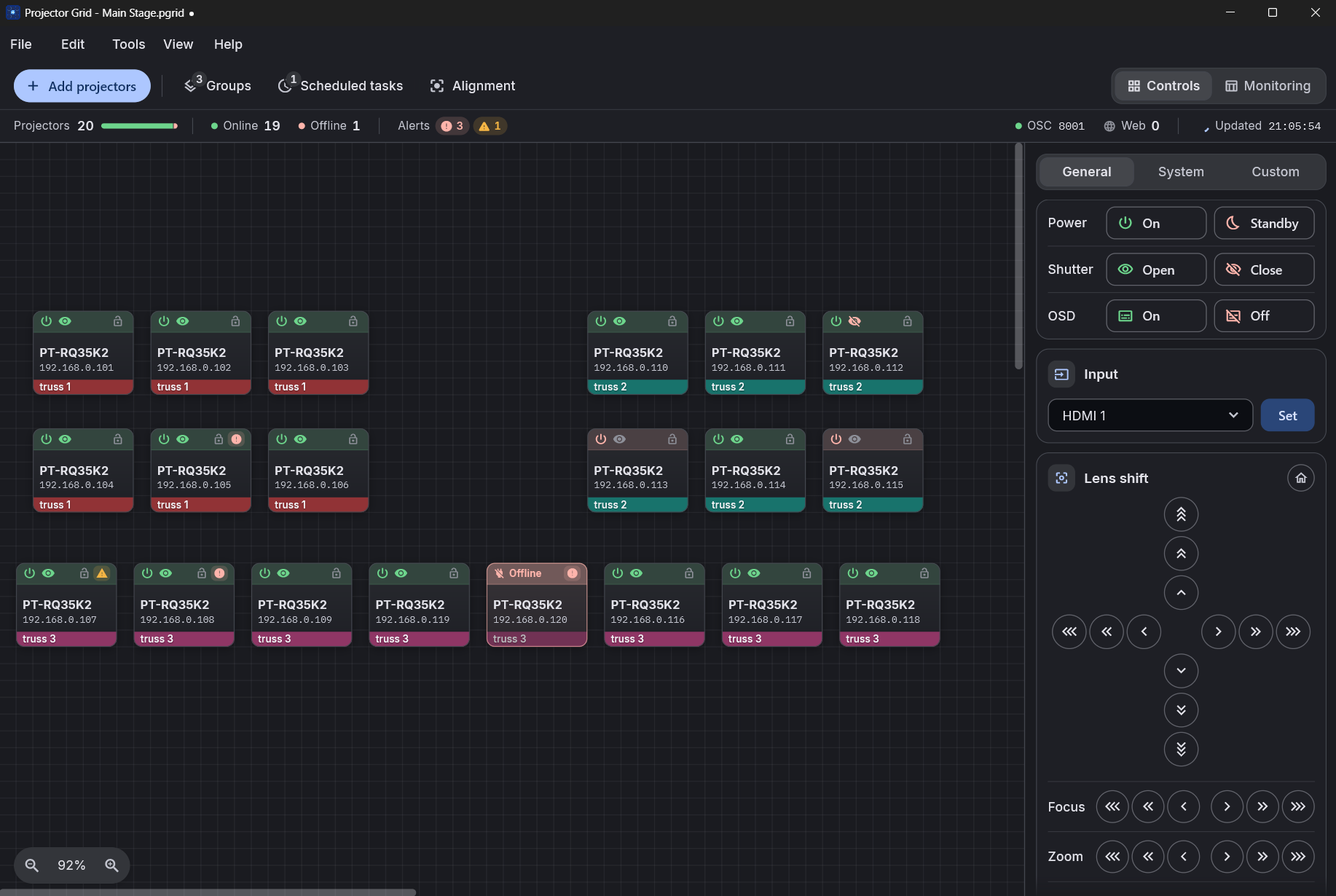
From the first focus
to the last cue
Everything a projection crew needs on show day - set up the wall, run the show, find out what happened.
Set up the rig
Find the projectors, lay them out like the real wall and line up the image.
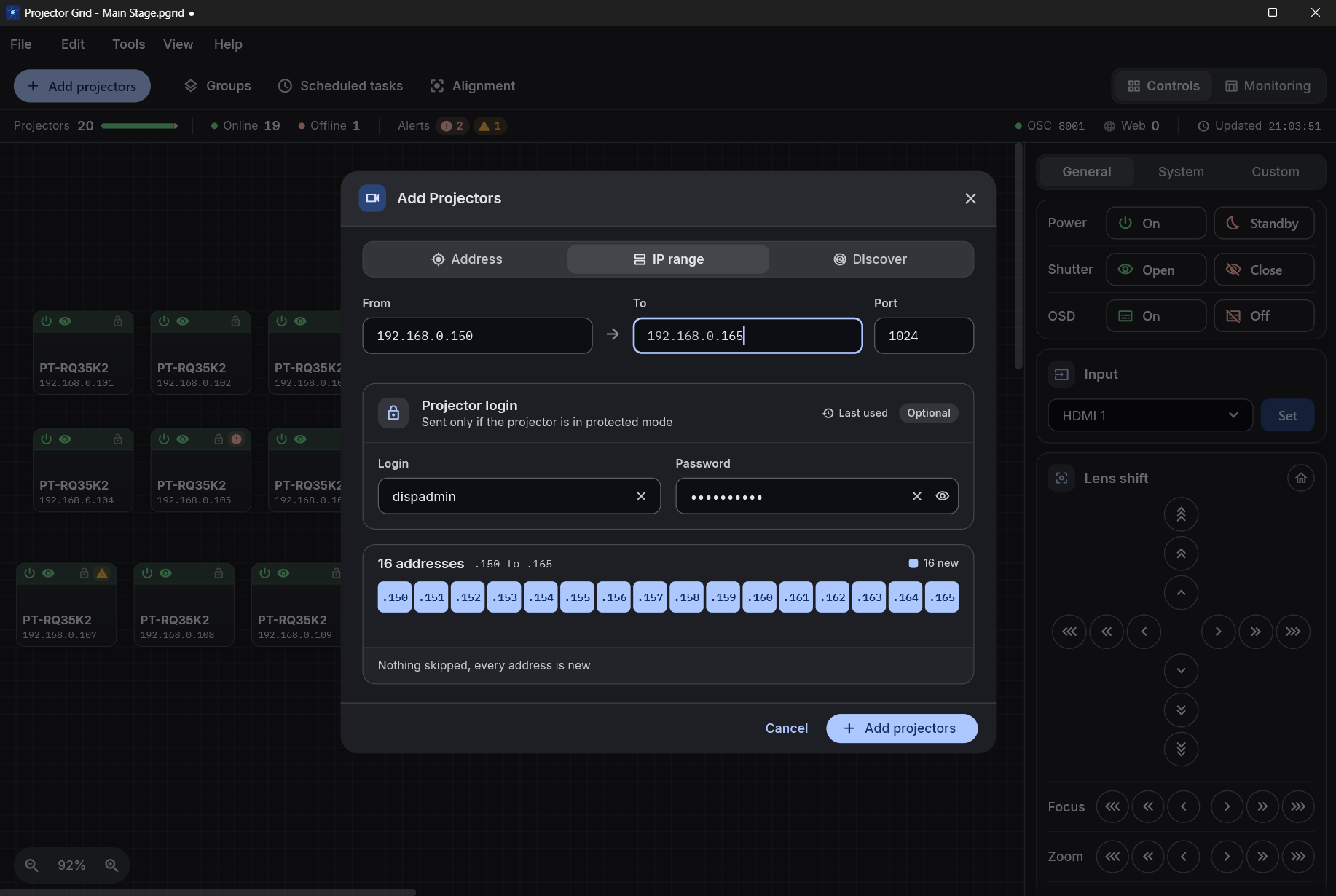
Scan the subnet, type one address or a whole IP range with a preview of every address it adds. Cards land on an infinite canvas you arrange like the real wall.
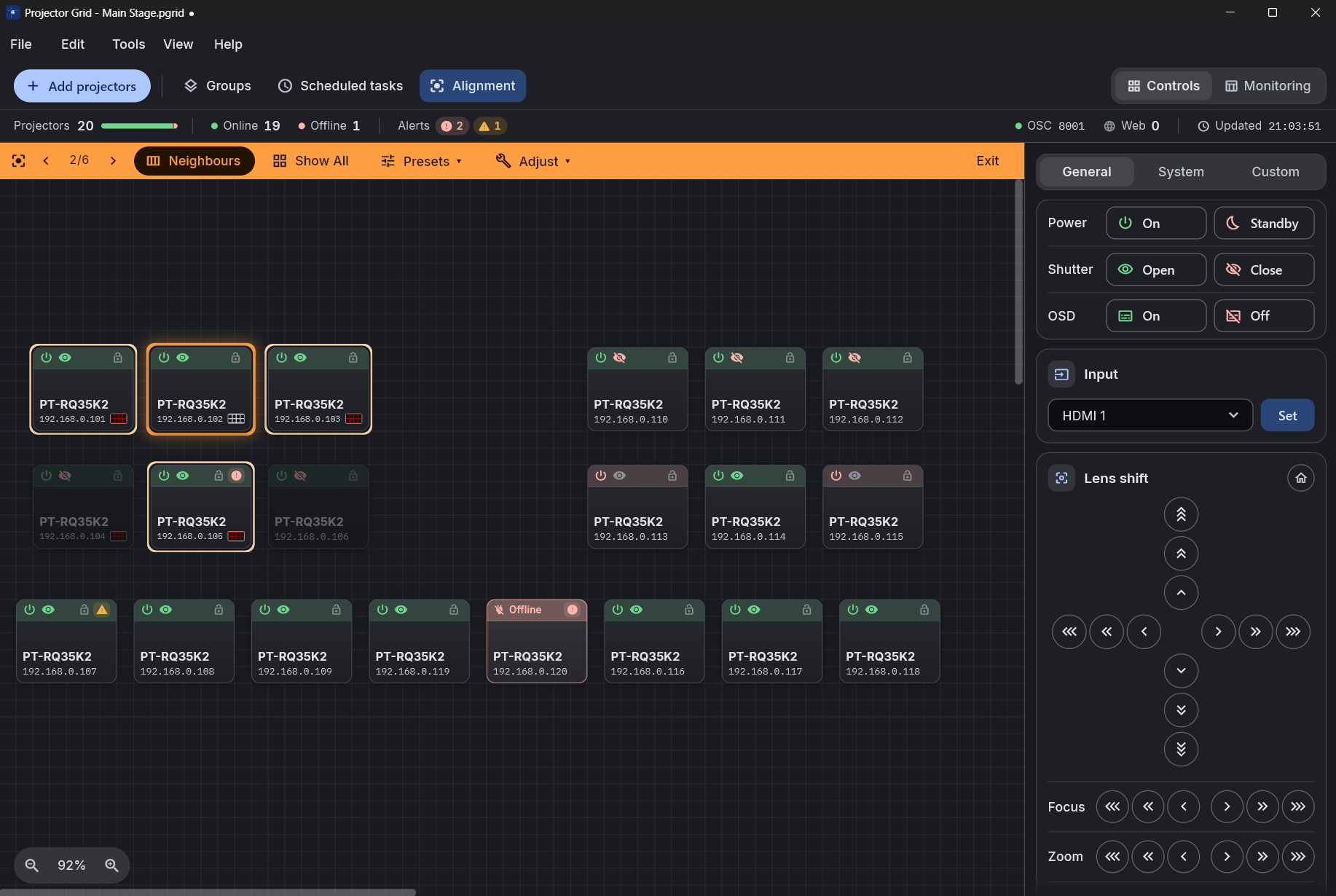
Step through the wall one projector at a time: the focused one shows its alignment pattern, the rest close their shutters. Open its neighbours, pick Geometry or Colour presets, jump straight to an adjustment. Leaving the mode puts every shutter and pattern back as it was.
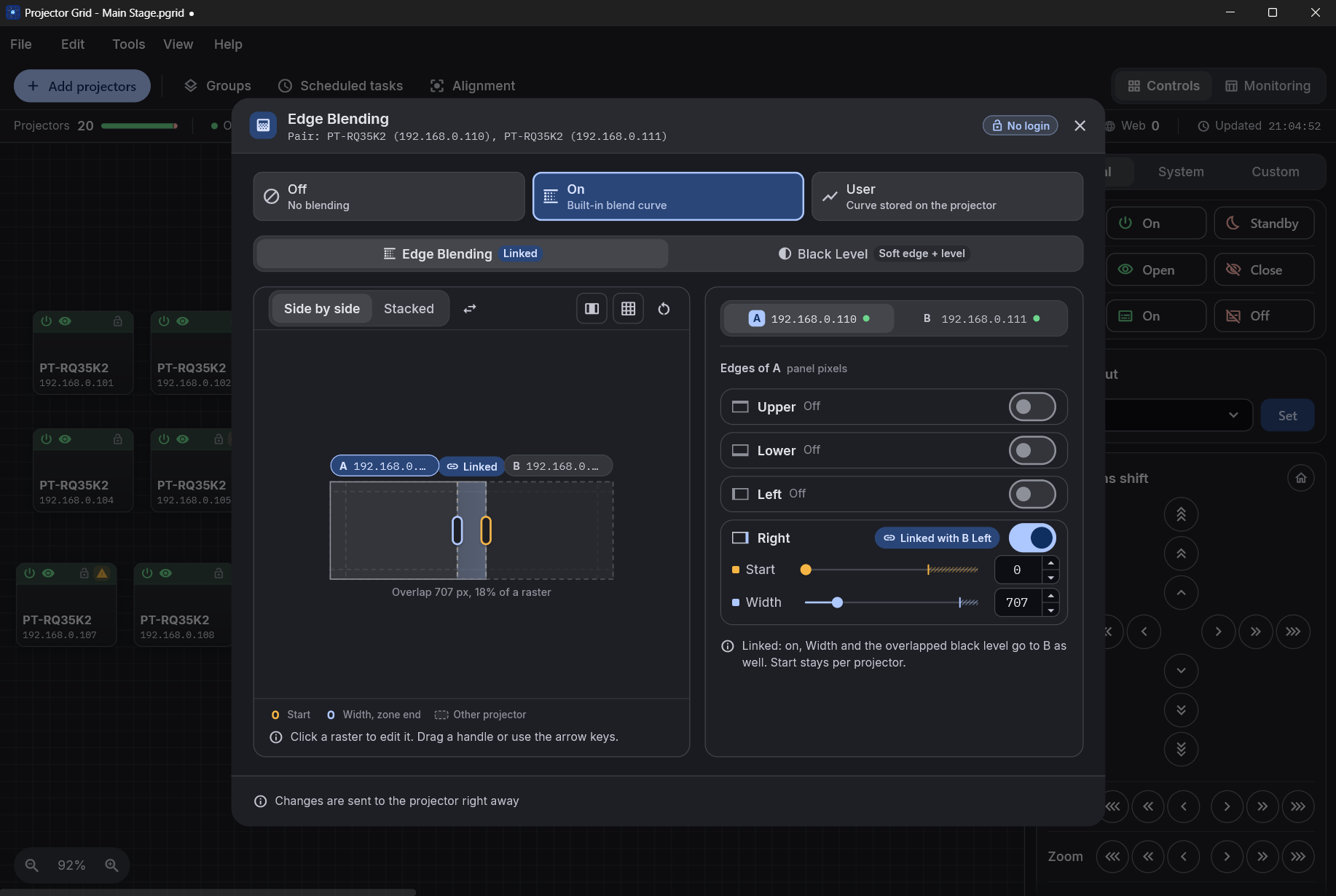
Start and width per edge on a canvas with draggable zones. Open two projectors as a pair, side by side or stacked, to see the overlap and link width and black level. Black Level sets overlapped, border and non-overlapped areas per R, G and B.
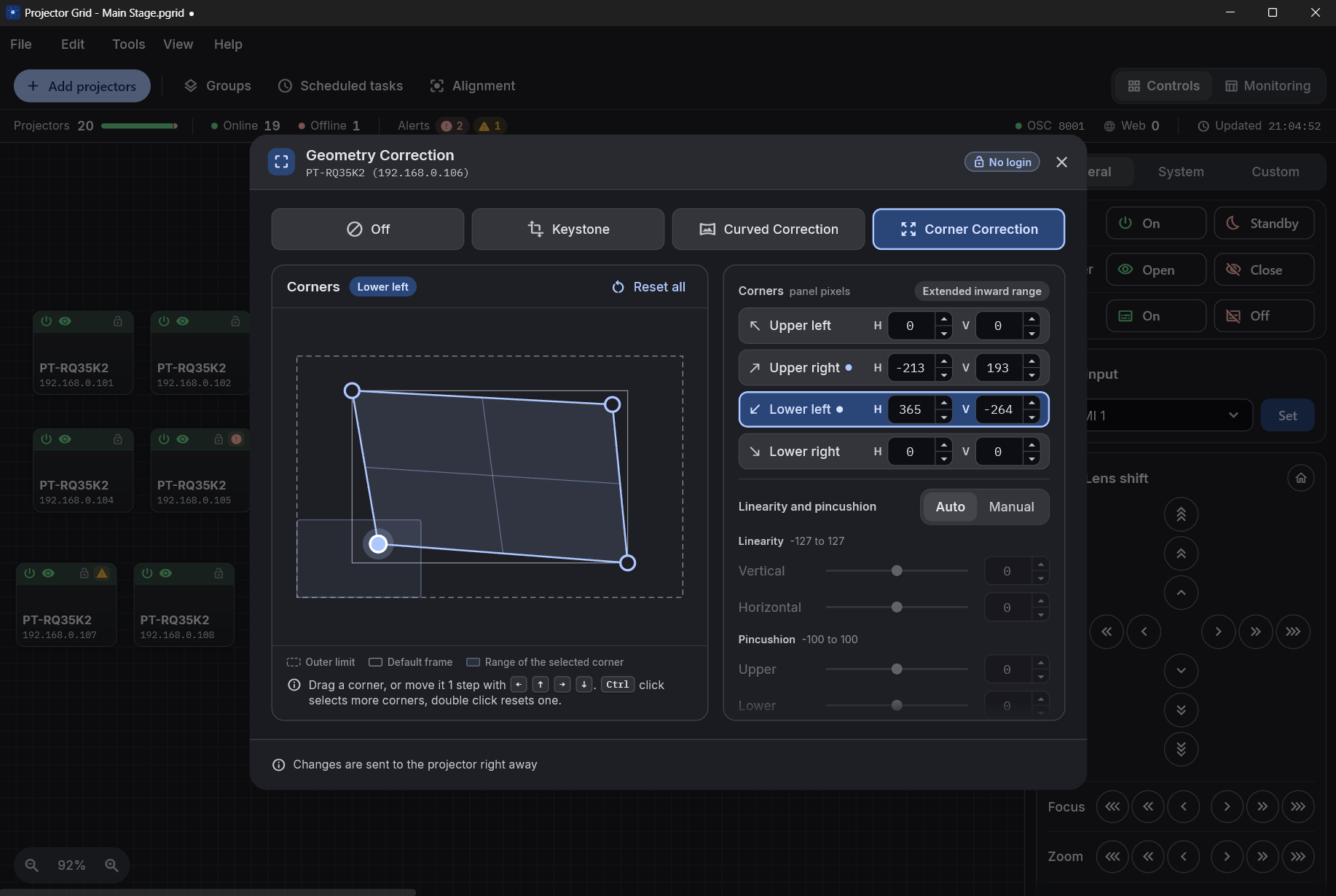
Keystone, curved and corner correction with a live preview drawn from camera measurements of a real projector. Brightness modes in 0.1 % steps, colour matching one colour at a time with colour-temperature presets.
Run the show
Watch every projector at a glance and hear about a problem before the audience sees it.
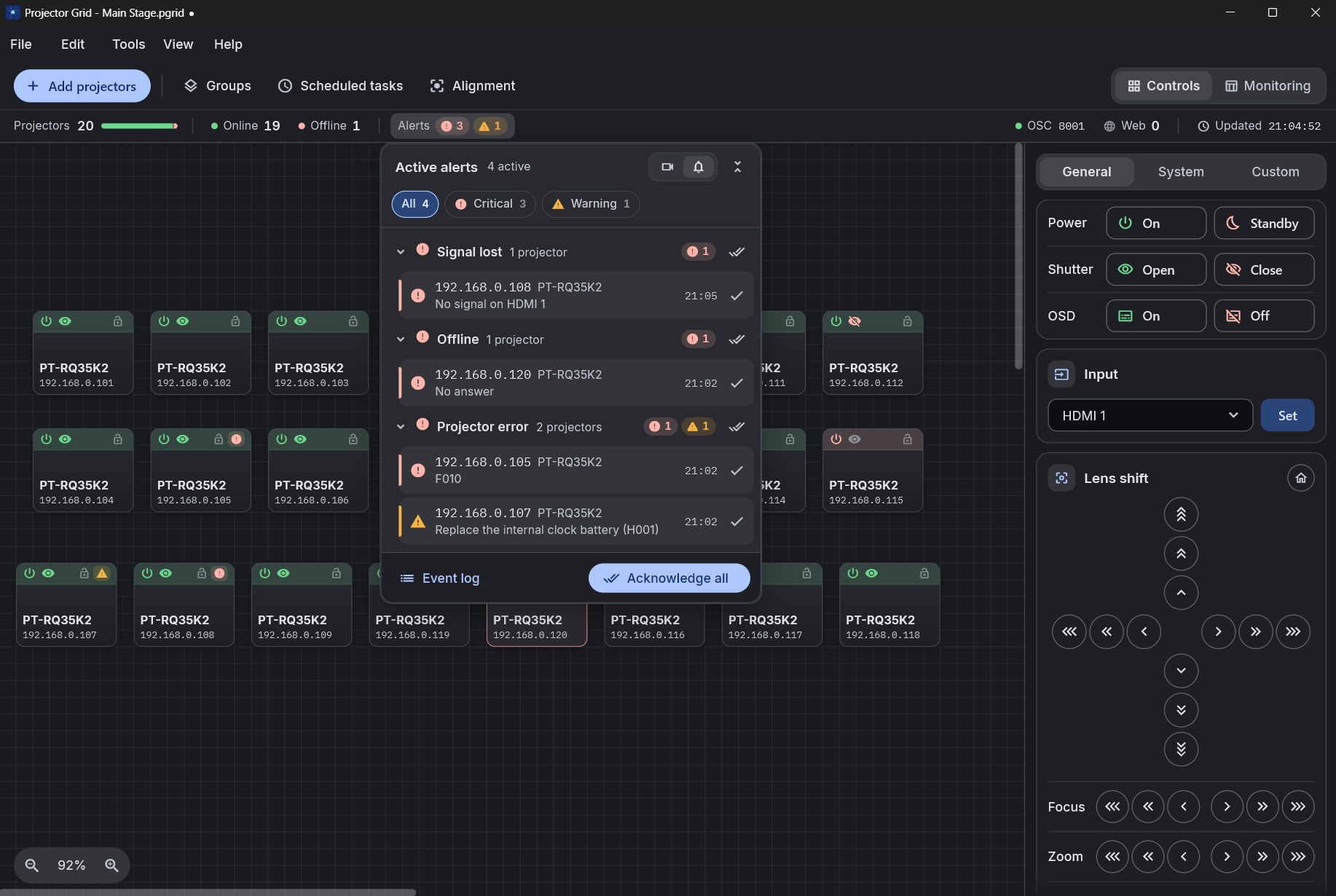
Offline, projector errors decoded by name (“Fan error F305”), signal lost - checked every 2 seconds, so even a short dropout is caught - and intake or exhaust temperature. Desktop notifications, alert sounds and OSC; acknowledge one alert or all of them.
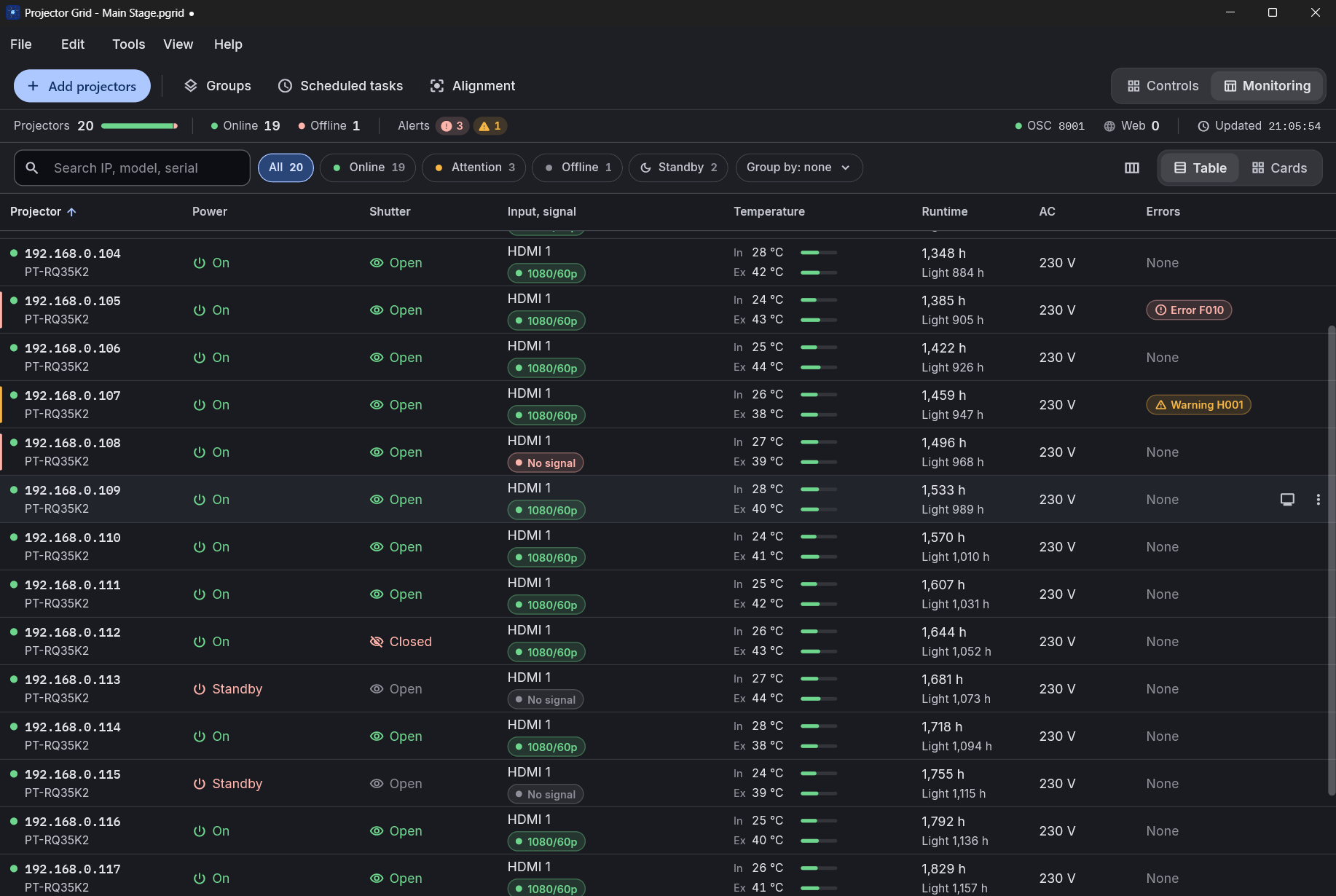
Power, shutter, input and signal, temperatures, runtime and errors for every projector. Search, quick filters with counts, Table or Cards view and a panel with every reading. Problem rows are striped, offline ones dimmed with the time they were last seen.
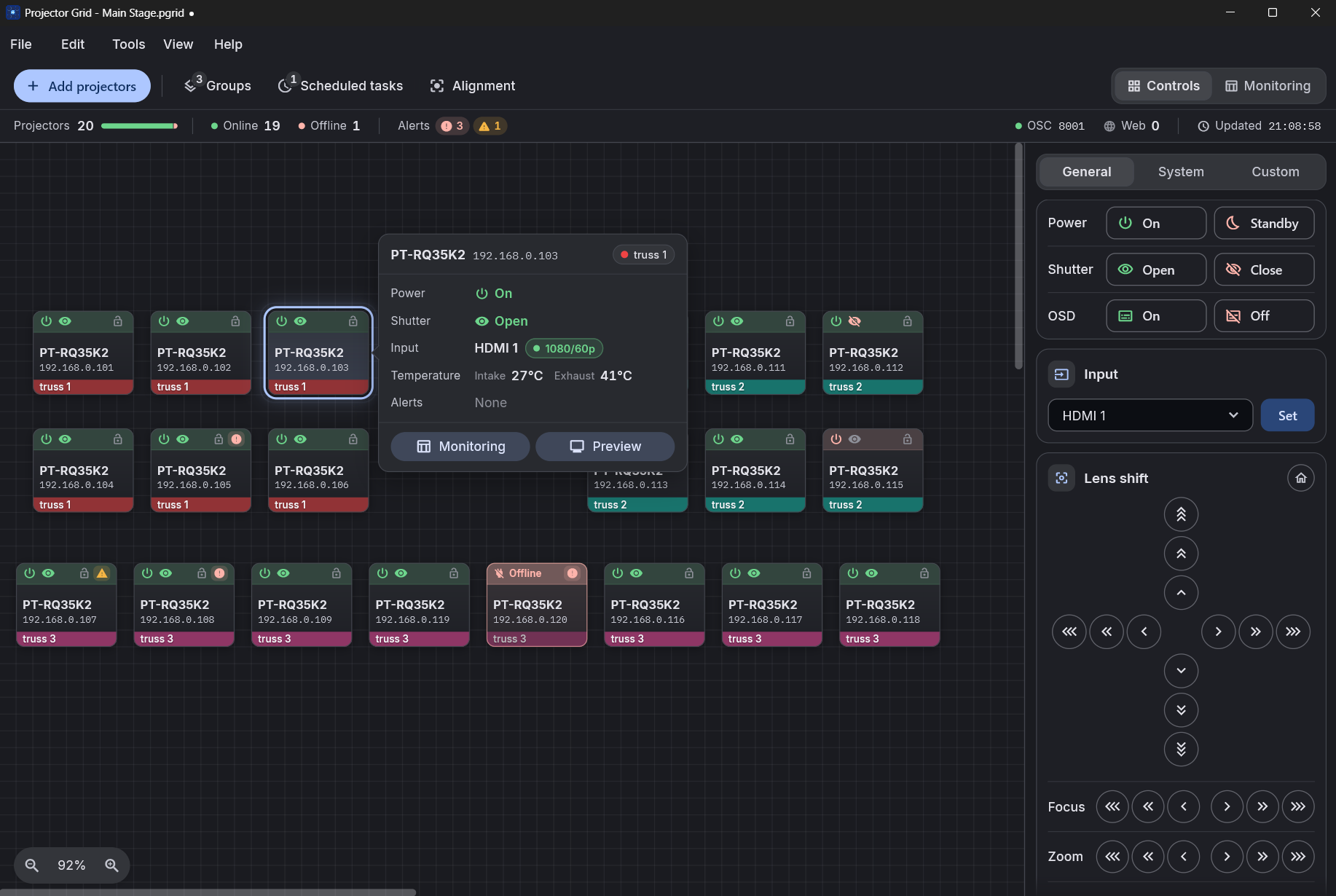
Select a card and press Space for its power, shutter, input, signal, temperatures and alerts - with Monitoring and Remote Preview one click away.
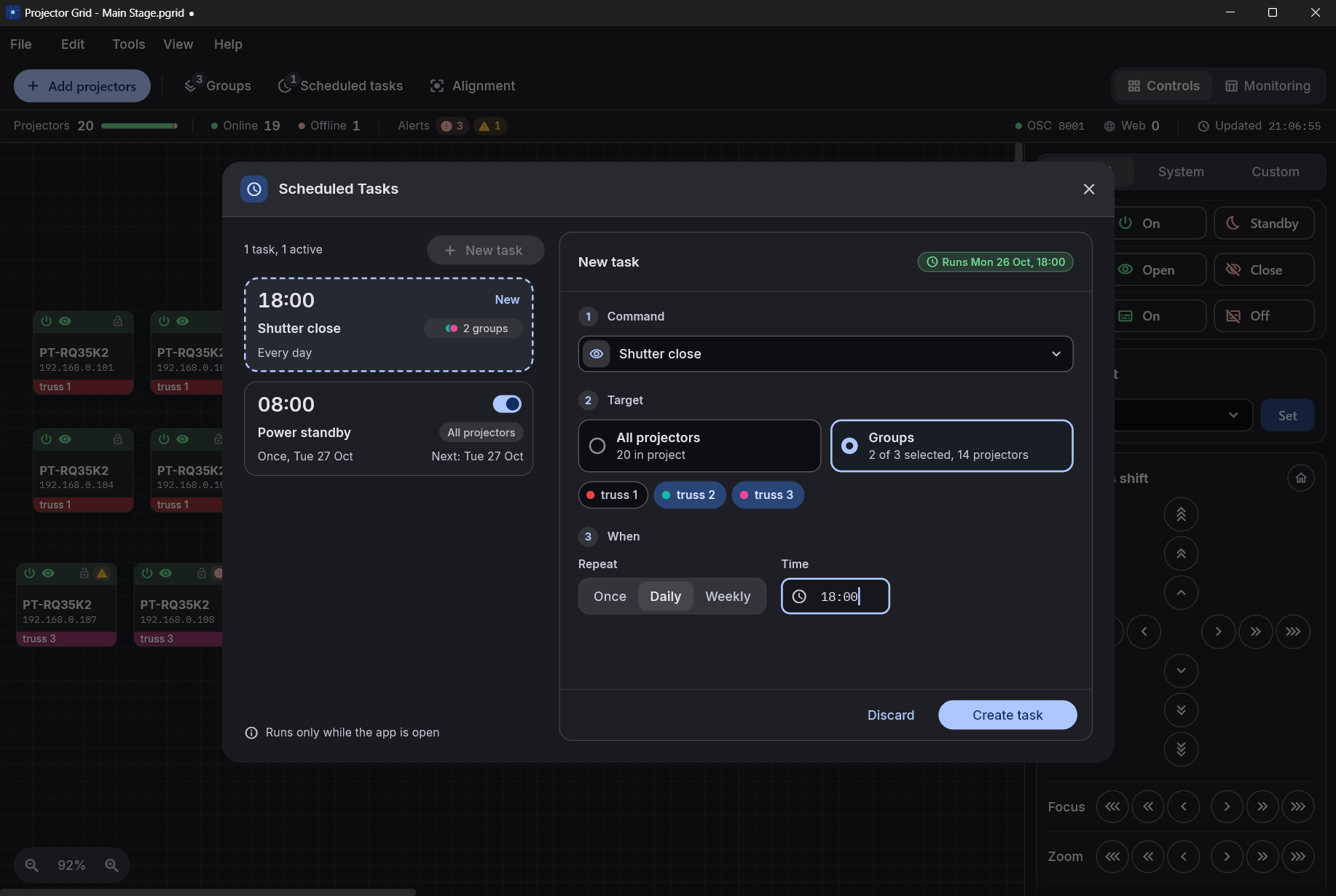
Power, shutter or any command at a set time - daily, weekly or once - for all projectors or several groups. A one-time task the app missed is marked “Not run” instead of firing late.
After the show
Find out what happened - and when.
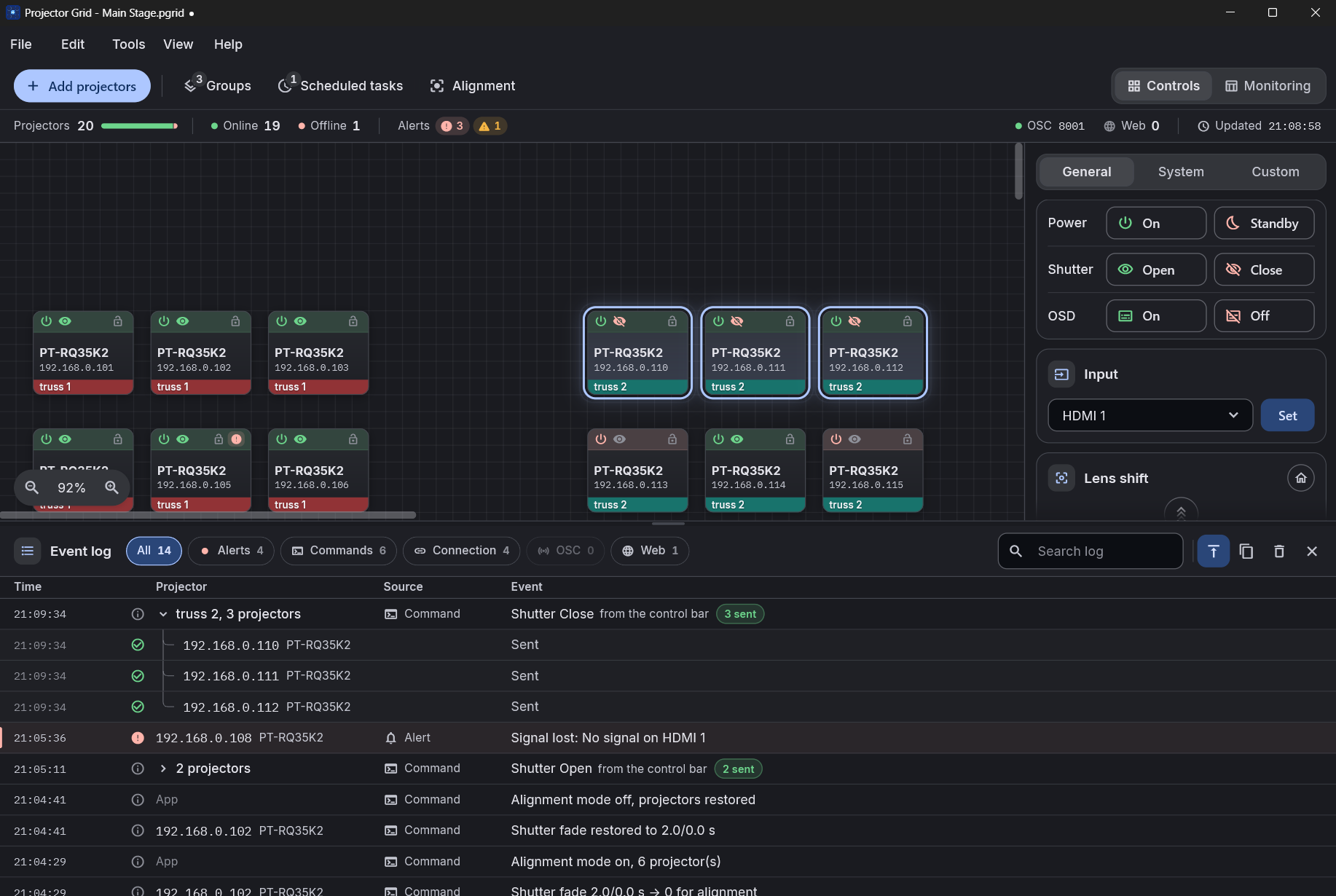
Event log Redesigned
Every command, alert and connection change. A command sent to many projectors is one row that opens to each result, with Retry failed. Filter by Alerts, Commands, Connection, OSC or Web.
Daily log files New
Every Event log line is also written to a daily file, kept for 14 days and ready to attach to a bug report. Help → Open Logs Folder takes you there.
Any networked Panasonic
Talks NTCONTROL, the protocol built into most Panasonic projectors. No model list to check: if it can be controlled over the network, it works.
No projector limit
Polling runs on a background worker and skips updates that change nothing, so large projects stay smooth - even with the window in the background.
Windows & macOS
Native on Windows 10+ and macOS 12+, Intel and Apple Silicon. Every dialog fits windows down to 800 × 600.
Keyboard-first
Alignment, search, quick status, select a whole group - all a shortcut away, with a searchable list of every shortcut.
Web Access.
The rig in your hand.
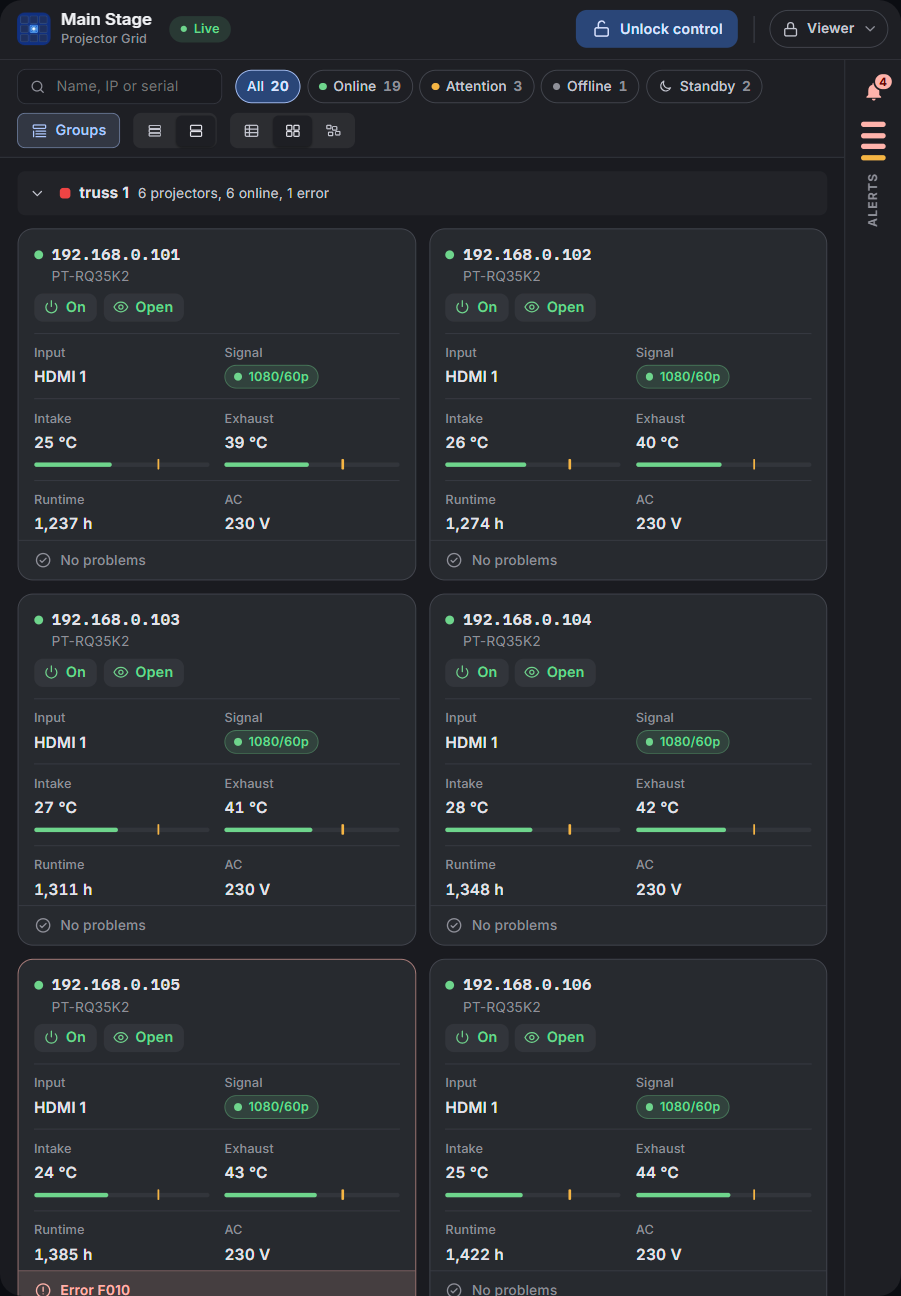
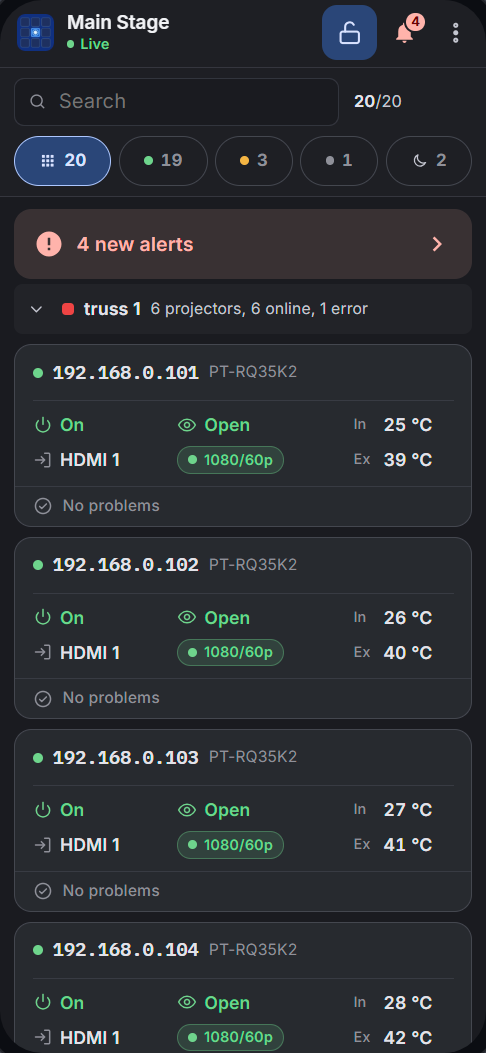
Any phone, tablet or laptop on the show network can watch and control the projectors in a browser - nothing to install. Walk the venue, check the far truss, close a shutter from the balcony.
Viewer and Operator PINs
A Viewer sees status, alerts and live updates. An Operator can also send power, shutter, input, test pattern and lens commands, and run Alignment mode - only while you allow control.
Table, cards or the map
The Monitoring columns, Compact or Extended cards, or the canvas layout of your project with zoom and marquee selection. Search, quick filters and select presets.
Alerts in your pocket
The Active alerts panel with acknowledge, alert sounds, a toast for each new alert and a count in the browser tab.
Fully offline
Served by the app itself - fonts and icons are bundled, nothing loads from the internet. The same API serves your scripts.
Turn it on in Preferences → Web Access and open the address shown therehttp://<your-computer>:8080
Fits into your show control
QLab, TouchDesigner or Resolume send commands over OSC and get live status and alerts back. Phones and tablets join through Web Access.
 Projector Grid
→ in Commands
/pgrid/all/power/onevery projector on/pgrid/group/stage/shutter/closeone group/pgrid/all/custom/dynamic-contrastyour own commands
← out Status & alerts New
/pgrid/status/onlinelive counts back/pgrid/alert/<rule>every alert change/pgrid/status/criticalunacknowledged alerts
How Projector Grid compares
Projector Grid overlaps two Panasonic tools - Multi Monitoring & Control Software and the Visual Software Suite (which absorbed the former Geometry Manager Pro) - in one cross-platform app. Panasonic’s tools go deep on configuration; Projector Grid is built to be fast and direct for the everyday jobs - powering a rig up or down, checking status, and quick geometry and colour adjustments. It is not a full replacement for the Visual Software Suite’s advanced warping, masking and camera calibration. Panasonic projectors today; other manufacturers are on the roadmap.
| Feature | Projector Grid | Panasonic MMCS | Panasonic VSS |
|---|---|---|---|
| Price / licence | Free · GPL-3.0 · source on GitHub | Free (Panasonic account) | Free (Panasonic account) |
| Platforms | Windows 10+ · macOS 12+ | Windows only | Windows only |
| Focus | Fast everyday control, monitoring & alignment | Fleet monitoring & control, up to 2,048 devices | Geometry, warping, edge blending, calibration |
| Control protocol | Panasonic | Panasonic + any PJLink brand | Panasonic |
| OSC in / out | Yes | No | No |
| Geometry & blending | Keystone, corner, curved, edge blending | - | Warp, curved, masking, edge blend |
| Live monitoring | Temp, runtime, voltage, errors, signal | Status + error notification | - |
| Alerts | Desktop, sound, OSC, browser | Error notification | - |
| Phone / tablet access | Built-in Web Access, PIN roles | - | - |
| Scheduling | Once / daily / weekly | Yes (calendar) | - |
| Account required | No | Panasonic ID (PASS) | Panasonic ID (PASS) |
| Open source | Yes | No | No |
Based on each product’s publicly documented features, 2026.
Download for your platform
Windows & macOS
Free and open source. No account required.
Saved you time on a show? Support Projector Grid on Gumroad
Frequently asked questions
Is Projector Grid free?
Yes. Projector Grid is free and open source under the GPL-3.0 licence, with the full source on GitHub. There is no account, licence key or subscription.
Which projectors does it support?
Panasonic projectors on your network. Most control commands are shared across Panasonic models, so a wide range of current models work; model-specific compatibility reports are welcome on GitHub. Support for other manufacturers is planned.
Does it run on macOS?
Yes. There are native builds for Windows 10 and later and macOS 12 (Monterey) and later. The macOS build is a universal binary for both Intel and Apple Silicon Macs.
How is it different from Panasonic's own software?
Projector Grid puts everyday control, live monitoring and common geometry adjustments in one cross-platform window, and it is OSC-first so show-control systems can drive it. Panasonic splits these across Multi Monitoring & Control Software and the Visual Software Suite (which absorbed the former Geometry Manager Pro), both Windows-only. Projector Grid is not a full replacement for the Visual Software Suite's advanced warping, masking and camera-assisted calibration.
Can I control projectors from QLab or TouchDesigner?
Yes. Projector Grid sends and receives OSC over UDP, so QLab, TouchDesigner and other OSC-capable show-control systems can trigger any command.
Can I control the projectors from a phone or tablet?
Yes. Web Access, added in 2.0, serves a web page from the app itself, so any phone, tablet or laptop on the show network can watch and control the projectors in a browser with nothing to install. A Viewer PIN gives read-only status and alerts; an Operator PIN can also send commands while control is allowed.
How does Projector Grid warn me about a problem?
Telemetry alerts watch every projector for going offline, projector errors (decoded into names such as "Fan error F305"), signal loss and intake or exhaust temperature. Each alert can raise a desktop notification and a sound, and is sent over OSC and to Web Access, until it is acknowledged.
Does it need a server or an internet connection?
No. Projector Grid runs entirely on your computer and talks directly to the projectors on your local network. Web Access is served by the app itself and works fully offline; there is no cloud service.
How many projectors can it handle?
There is no built-in limit on the number of projectors you can monitor and control from one workspace. Polling and commands run concurrently across the array, and it is built for large-scale projection mapping and permanent installs.
Is any of my data sent anywhere?
No. Projector Grid collects no usage data and has no analytics; its telemetry alerts read the projectors and stay on your computer. It only communicates with the projectors you add and the devices you allow on your local network.